
Unlocking the Full Power of Google Analytics 4
Digital marketing agencies and performance marketers are embracing Google Analytics 4 (GA4), the modernized successor to Universal Analytics (UA).
While GA4’s redesigned interface and event-driven data model felt intimidating to many when first announced, it introduces a suite of sophisticated capabilities that were either cumbersome or entirely impossible within legacy UA.
GA4 measures user interactions using custom parameters and distinct events rather than rigid, pageview-bound sessions. This gives brands unprecedented flexibility to map complex customer journeys.
Ready to level up your reporting? Here are three game-changing GA4 features you should be utilizing immediately.
1. Visualize Your User’s Path with Funnel Explorations
GA4 comes equipped with advanced Funnel Exploration reports that allow you to track users through customized conversion funnels with greater accuracy than ever before.
In legacy Universal Analytics, custom funnels were largely locked behind the enterprise 360 tier or restricted to basic URL goal paths. In GA4, every property has access to deep, multi-step funnel visualization.
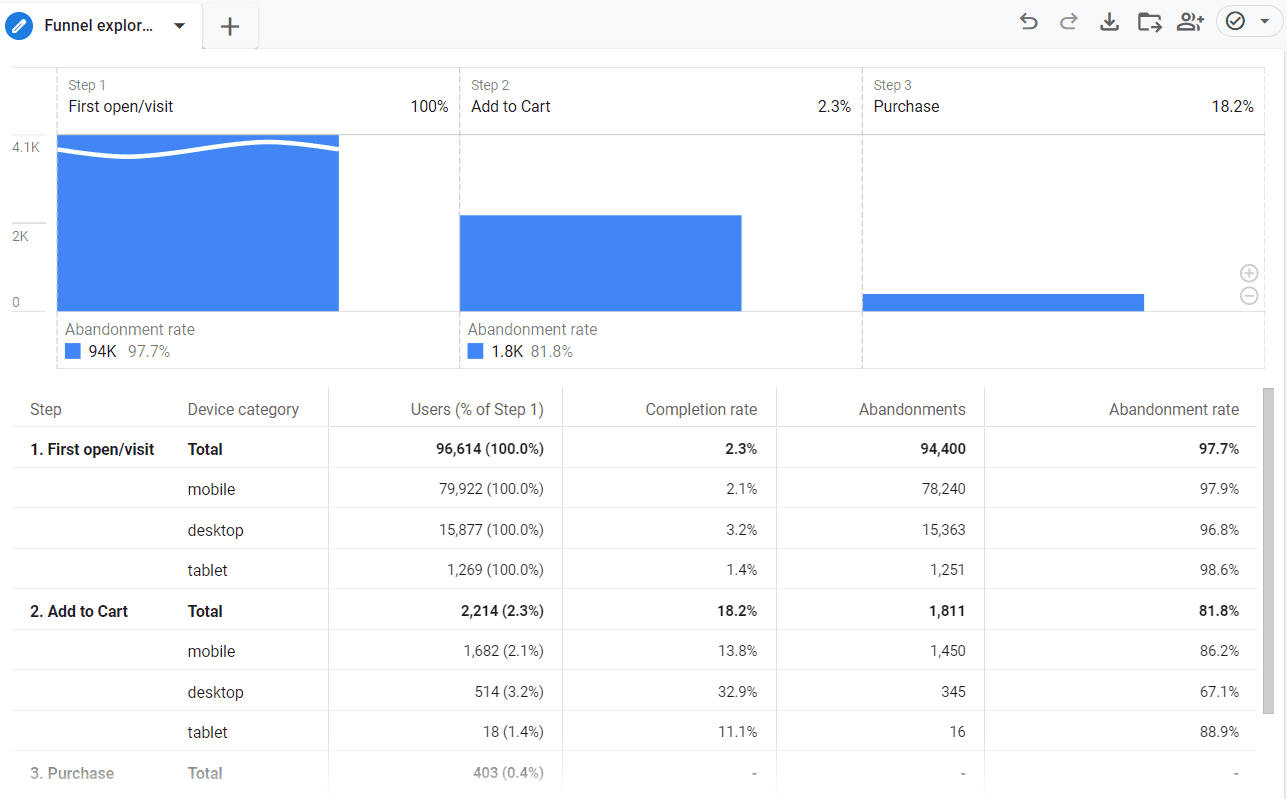
GA4 Funnel Exploration Report highlighting user conversion rates across stages
Why Funnel Explorations Are Invaluable:
- Pinpoint Abandonment Stages: Discover precisely where potential buyers abandon your funnel (e.g., viewing a product page vs. adding to cart vs. initiating checkout vs. submitting payment).
- Open vs. Closed Funnels: Analyze users who follow strict sequential steps, or examine how shoppers enter the purchase journey midway through promotional campaigns.
- Identify High-Value Products: Segment funnels by product category or brand to isolate which inventory drives rapid checkout velocity and which catalog items suffer from friction.
Armed with this diagnostic clarity, UX designers and conversion rate optimization (CRO) specialists can make targeted, high-impact refinements to your checkout architecture.
2. True Cross-Device and Cross-Platform Tracking
One of the greatest blind spots of legacy Universal Analytics was fragmented cross-device tracking. If a consumer browsed your store on their smartphone during their morning commute and returned to complete the order on their office desktop, UA frequently counted them as two distinct visitors with separate, unrelated sessions.
GA4 delivers a massive architectural upgrade in this department:
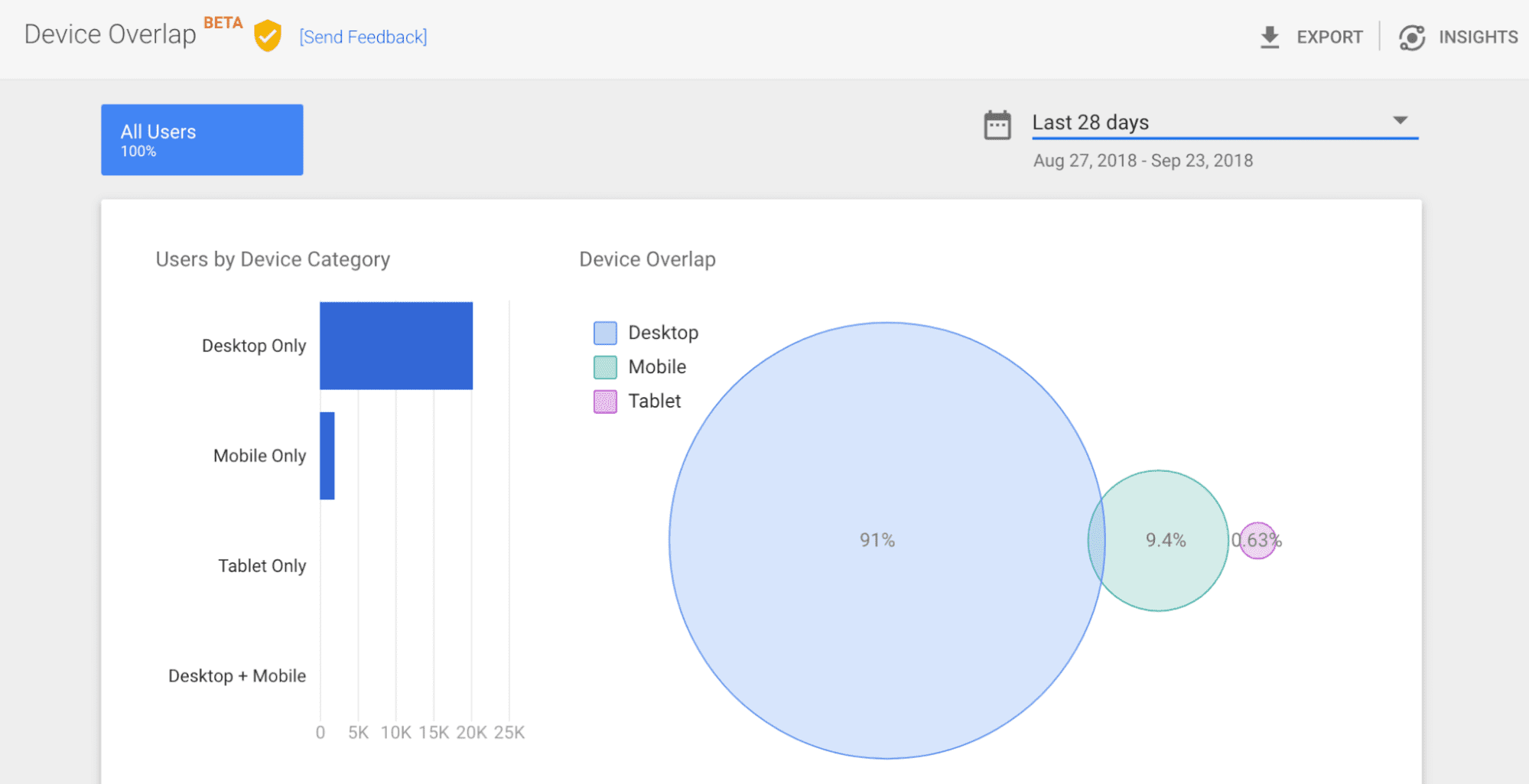
GA4 unifies user touchpoints across mobile, tablet, and desktop
How GA4 Stitches the Customer Journey:
GA4 uses an advanced, tiered identity space hierarchy to unify touchpoints:
- User-ID: First-party authenticated identifiers passed when users sign into accounts on your website or app.
- Google Signals: Aggregated data from consenting users logged into their Google accounts, enabling cross-device re-identification.
- Device ID: First-party browser cookies (client ID) or mobile advertising IDs.
- Behavioral Modeling: Sophisticated machine learning algorithms that estimate cross-platform interaction paths when cookie identifiers are restricted.
This holistic view provides realistic attribution data, helping you understand how top-of-funnel mobile ad impressions ultimately convert into high-ticket desktop purchases.
3. Predictive Analytics Powered by Machine Learning
Perhaps the most revolutionary addition to GA4 is its native machine learning engine, which brings Predictive Analytics directly to standard accounts without requiring custom data science pipelines.
By continuously analyzing user engagement patterns, Google’s AI models forecast future user behavior over the subsequent 28-day window:
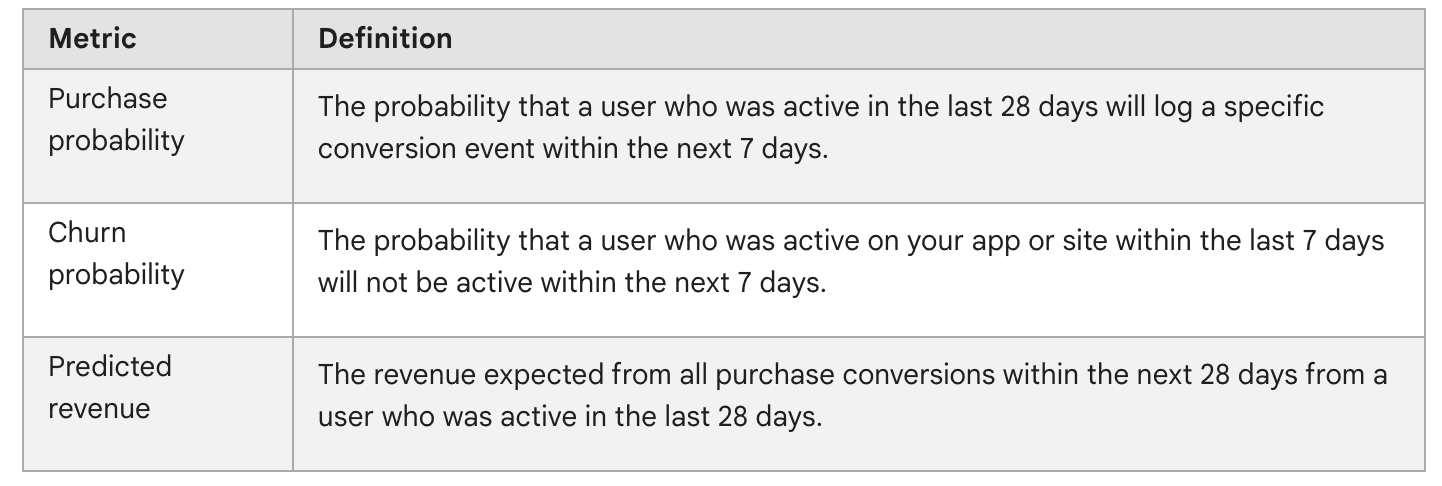
Predictive metrics available within Google Analytics 4
Core Predictive Metrics in GA4:
- Purchase Probability: The likelihood that an active user will log a purchase within the next 7 days.
- Churn Probability: The probability that a previously active user will disengage from your app or site over the coming 7 days.
- Predicted Revenue: The expected revenue generated from all purchase conversions over the next 28 days by users active in the last 28 days.
Turning Predictions into High-ROAS Google Ads:
The true power of predictive metrics comes from direct audience synchronization. You can build targeted audiences such as:
- Likely 7-day purchasers: Retarget these warm prospects with closing incentives on Google Search or YouTube.
- Likely 7-day churning purchasers: Re-engage past buyers with targeted winback offers or email campaigns before they permanently migrate to competitors.
Maximize Your GA4 Implementation
Google Analytics 4 is far more than an updated interface—it is an intelligent measurement engine designed for a privacy-first, multi-device ecosystem. By activating Funnel Explorations, cross-device identity spaces, and predictive audiences, you unlock deeper strategic insights that accelerate business growth.